
The VPN that's actually yours alone.
Most VPNs put you on a shared connection with thousands of strangers. NorexVPN gives you your own private VPN. Clean IP, full speed, nobody else on it.
- Your own server
- Never-shared IP
- Zero activity logs
- WireGuard protocol
- Up to 16 devices
- Cancel anytime
“This was the best VPN I’ve used by far quick and easy no hassle highly recommend”
Sales Consultant
Start your 7-day free trial
Cancel before it ends and pay nothing.
Not charged for 7 days · then $19.99/month
What people are saying
Real users. Real privacy.
Not like other VPNs.
Shared VPNs sell you privacy, then put you on the same VPN as thousands of strangers.
Only NorexVPN
Your traffic never touches another user's. You get your own VPN, your own IP. Yours alone.
Shared VPNs: The problem. Hundreds or thousands of users can share the same VPN and IP, which often means slower speeds and more blocks.
Clean & yours only
Private VPN, not shared with anyone. Clean IP address. No other users on your connection.
Shared VPNs: Shared with strangers. IPs often get flagged because of what other users do. You share an IP with people you'll never know.
Consistent
Consistent, reliable speeds. Your bandwidth isn't split with anyone else on the server.
Shared VPNs: Slowed by load. Speeds can drop when the server gets busy with other users.
Real privacy
No shared identity online. Your IP belongs only to you, not a crowd you're hiding in.
Shared VPNs: A crowd to hide in. Your privacy depends on blending in with strangers on the same IP. With NorexVPN your connection is uniquely yours, not a crowd you're hiding in.
Every member gets their own server.
Not a slice of a shared box. Not a shared IP pool. A private server deployed for you, used by you, and nobody else.
What you actually get
Privacy that works at the network level, not just in your browser.
Your own IP address
Your private VPN gives you an IP nobody else uses. No shared blacklists. No association with other users. No surprises.
No activity logs
Your server doesn't record your browsing, the sites you connect to, or your DNS queries. Your activity is yours and nobody else's.
Ad & tracker blocking
Network-level filtering strips ads and trackers before they ever reach your device, on every app, not just your browser.
Malware & phishing blocking
Known malicious and phishing sites are blocked automatically before your device ever connects to them.
Always-on protection
Your connection stays private on every network (home, hotel, airport, café) without you having to think about it.
No speed throttling
Shared VPNs slow down when too many users pile on. Your private VPN isn't shared, so there's no crowd slowing you down.
Your private VPN, wherever you need it.
Pick your region. Connect through your own private VPN. No overcrowding, no slowdowns.
North America 9
- Miami US
- Newark US
- Atlanta US
- Dallas US
- Chicago US
- Fremont US
- Los Angeles US
- Seattle US
- Toronto CA
Europe 6
- London UK
- Frankfurt DE
- Amsterdam NL
- Paris FR
- Milan IT
- Stockholm SE
Asia-Pacific 7
- Singapore SG
- Tokyo JP
- Osaka JP
- Mumbai IN
- Chennai IN
- Jakarta ID
- Sydney AU
South America 1
- São Paulo BR
23 cities across North America, Europe, Asia-Pacific and South America. Your dedicated server deploys in the city you choose and stays there, reserved for you.
Always your VPN
Every connection goes through a private VPN that belongs exclusively to you, never shared with strangers.
Choose your location
Select a region that fits your needs: for speed, lower latency, or privacy when travelling abroad.
Consistent performance
No slowdowns from other users. Your bandwidth is yours alone.
Managed from one dashboard
Add devices, and manage everything from a single clean interface with no friction.
Your own private VPN, ready in minutes.
No tech knowledge needed. Scan a QR code or import a config file. That's it.
A private VPN set up just for you
When you sign up, you get a private VPN assigned to your account. Not shared. Not pooled. Entirely yours.
Connect any device in minutes
Scan a QR code on mobile or import a config file on desktop. Your device connects directly through your private VPN.
Browse privately
All your traffic routes through your private VPN, encrypted from your device to your server. Your browsing isn't logged, and nobody else shares your connection.
Set up your device
Pick your platform and follow three quick steps.
 Built on WireGuard
iPhone / Android
Install WireGuard
Open the App Store or Play Store and install WireGuard on your phone.
Scan the QR code
Create your device, then scan the code from your dashboard to add the connection.
Connect instantly
Tap connect and your phone is protected on home Wi‑Fi, public hotspots, or while traveling.
Mac / Windows
Install WireGuard
Download WireGuard from the official site or your system's package manager.
Import the config file
Download your config file from the dashboard and import it directly into WireGuard.
Activate and browse
Toggle the tunnel on and your traffic is instantly routed through your private VPN.
Linux / Bash
Install WireGuard
Run sudo apt install wireguard or the equivalent for your distro.
Download your config
Grab your .conf file from the dashboard and place it in /etc/wireguard/.
Bring it up
Run sudo wg-quick up wg0 and you're connected. Add to systemd for auto-start.
Every device, one clean list.
Create a device, scan its QR code, and see which tunnels are live.
No email.
No password.
ZeroID.
Create an account with nothing but a random access key.
Standard checkout uses email and card as usual. ZeroID is an extra option for members who want maximum privacy. ZeroID accounts are crypto-only and don't include the free trial.
We generate a unique 6-word access key, shown to you exactly once.
You save it somewhere safe. It's your login, your password, and your receipt.
Pick your plan & region, pay with Solana Pay, and your dedicated server deploys.
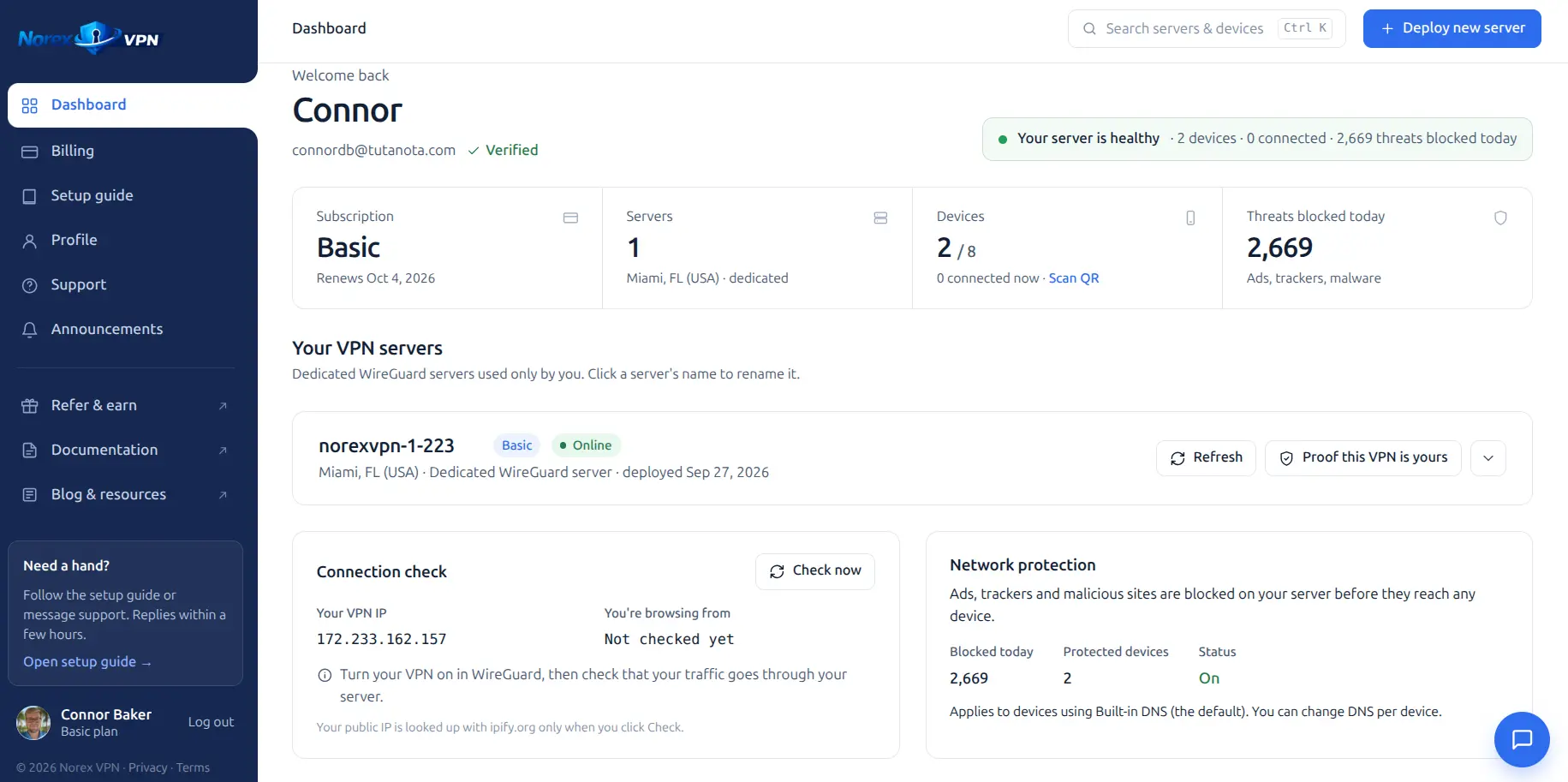
One dashboard.
Total control.
Add devices, generate QR codes, manage connections. No bloat. No confusion. Just your private network, cleanly managed.
Add your devices
Name a phone, laptop, or desktop in seconds. Each gets its own private, isolated connection on your VPN.
Scan or download instantly
Grab a QR code for mobile or a config file for desktop, ready the moment you create the device.
Your private network, always on
Every connected device routes through your private VPN. Clean IP. No shared users. No leaks.
Your own private VPN
Not shared with anyone. Your IP is clean, your connection is yours.
Clean IP address
Nobody else uses your IP, so it stays clean and unassociated with other users' activity.
No activity logs
Your server doesn't record the sites you visit or your DNS queries, and we never sell your data.
WireGuard encrypted
Modern encryption on every device. Set up in under 2 minutes.
NorexVPN vs. the big names.
| Feature | NorexVPN | NordVPN | ExpressVPN |
|---|---|---|---|
| Private server for every member | Included | Shared servers | Shared servers |
| Dedicated IP | Included | Paid add-on | Top plan or paid add-on |
| People on your IP | Just you | Hundreds | Hundreds |
| Sign up with no email, pay in crypto | ZeroID | No | No |
| Protocol | WireGuard | NordLynx (WireGuard-based) | Lightway |
Based on publicly listed features as of September 2026. NordVPN and ExpressVPN are trademarks of their respective owners.
Simple, honest pricing.
No hidden fees. No contracts. Try free for 7 days before you pay anything.
Basic
Everything you need for yourself.
Billed monthly
Start free trialFree for 7 days. Cancel anytime.
- Your own private VPN
- Clean IP / IPv6, never shared
- Up to 8 devices
- WireGuard encryption
- Zero activity logs
- Ad & tracker blocking
- Malware & phishing protection
- Multiple VPN locations
- Cancel any time
Pro
RecommendedCovers your whole household.
Billed monthly
Start free trialFree for 7 days. Cancel anytime.
- Everything in Basic
- Up to 16 devices, covers your whole household
- Higher performance VPN server
- Faster VPN provisioning
- Bandwidth priority
- Early access to new features
- Priority support
- Cancel any time
Those services typically put many users on the same shared servers and IP addresses. With NorexVPN, you get your own private VPN. Your IP is clean, never shared, and belongs exclusively to you.
No. Your VPN server doesn't record the sites you visit, the addresses you connect to, or your DNS queries. We keep only what we need to run your account, like your email and billing status, so there's no activity history to hand over or sell.
On a shared VPN, your IP is used by many other people. It can get flagged, blocked by streaming services, and slowed down by their activity. With your own private VPN, other users' activity can't affect you.
It takes under two minutes. On mobile, scan a QR code in WireGuard and you're connected. On desktop, import a config file with one click. No technical knowledge required.
Yes. Add as many devices as your plan allows from your dashboard. Each one gets its own private connection through your VPN. Basic covers up to 8 devices and Pro covers up to 16.
Yes, it's designed for it. Airports, hotels, cafés, foreign networks. Your private VPN protects you wherever you connect.
Basic is $9.99/month or $99.99/year and covers up to 8 devices. Pro is $19.99/month or $199.99/year and covers up to 16 devices. Annual billing gets you 2 months free.
Yes. Try NorexVPN free for 7 days. A card is required to activate your trial, you're not charged for 7 days, and you can cancel any time before then without paying anything.